Windows Update Error 0x8024402C in Windows 7, 8, 2012, 2008 R2, Vista
Windows Update Error 0x8024402C occurs when running windows update and you try to connect to the Windows or Microsoft Update Website.
Please see this post for an overview of how to troubleshoot Windows Updates: How to Troubleshoot Windows Update Issues
Please see this post for an overview of how to troubleshoot Windows Updates: How to Troubleshoot Windows Update Issues
if you view the logs located at: %windir%\windowsupdate.log you may also see this error present like this:
FATAL: SelfUpdate check failed, err = 0x8024402C
2013-05-11 11:41:27:095 1208 2344 Agent * WARNING: Skipping scan, self-update check returned 0x8024402C
2013-05-11 11:41:27:095 1208 2344 Agent * WARNING: Exit code = 0x8024402C
This issue is commonly caused by Firewall Settings not being correctly set within Internet Explorer. There are 3 ways in which you can attempt to correct this error:
Method 1:
Download and run the Microsoft Windows Update Readiness Tool located at: http://support.microsoft.com/kb/947821 . If this fails to solve the issue then please try one of the other methods.
Method 2:
This Method is for if you ar ein a corporation or campus that uses a Proxy Server.
- Open Internet Explorer and go to Tools -> Internet Options
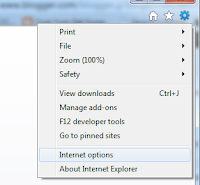
- Click on the Connections Tab, select LAN Settings and choose OK


- Choose the Advanced Button
- Clear any entries under the exceptions window and choose OK

- Open a command prompt:
- In Windows 7, Vista, 2008 either:
- Go to start chose run and type in cmd and press OK . Or:
- Type command prompt into the search bar in the start menu
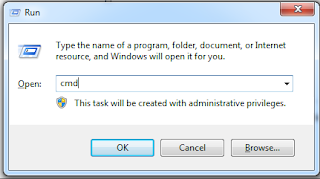
- In Windows 8
- Go to the Start Screen and type command prompt. This will open a search screen where you can then select command prompt from the right hand side

- in the command prompt window, enter the following pressing Enter After each command
- netsh winhttp reset proxy
- net stop wuauserv
- net start wuauserv

- restart the computer and try and install updates again




Method 3:
- Open Internet Explorer

- Go to Tools -> Internet Options
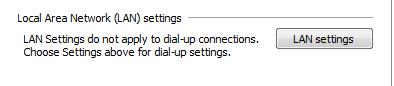
- Click on Connections -> LAN Settings
- Select Automatically Detect Settings

- Choose OK
- close and re open Internet Explorer and try installing updates again.

